
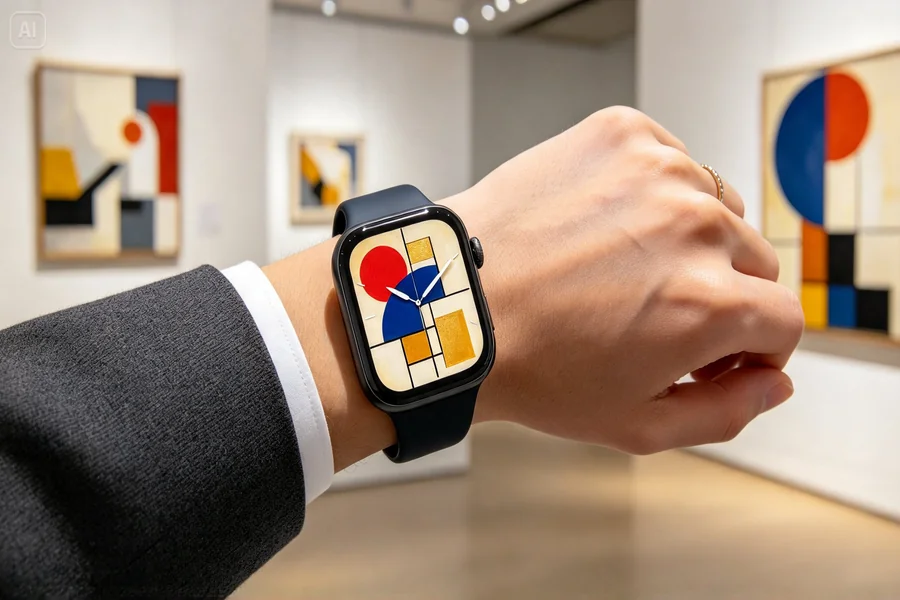
Your wrist is the smallest gallery you will ever curate. Smartwatch owners, horology fans, and indie accessory brands are all asking the same question: how do you create a watch face that feels like a gallery piece instead of a stock template? An AI image generator like Dreamina gives you an answer.
By pairing powerful image models with a simple prompt box, you can generate custom watch face designs inspired by Cubism, Bauhaus, Abstract Expressionism, Pop Art, and more, then polish them into files ready to use or share.
This guide walks you through the whole process, from picking an art movement to downloading your finished design.
Why modern art makes perfect watch faces
Modern art is built on bold shapes, deliberate color, and strong composition, which are exactly the qualities a watch face needs. A watch dial is a tiny circular canvas that must be readable at a glance. Movements like De Stijl, Suprematism, and Color Field painting reduce visuals to essential forms, so they translate beautifully into a layout where hour markers and hands must remain clear.
There is also an emotional reason. People wear watches as self-expression. A face inspired by Kandinsky’s geometric compositions or a Rothko-style gradient says something about the wearer before they say a word.
Art movements to borrow from
Start by choosing a visual language. Each of these movements brings a distinct personality to a dial:
-
Bauhaus: primary colors, clean circles, and functional typography.
-
Cubism: fragmented planes in muted earth tones, great for a sophisticated look.
-
Pop Art: halftone dots, saturated color, and comic-style outlines.
-
Abstract Expressionism: energetic brush marks and layered, textured color.
-
Minimalism and Color Field: soft gradients and wide empty space for ultra-clean readability.
-
Surrealism: dreamlike melting forms and unexpected symbolism.
Meet the AI models behind your designs
Dreamina brings several leading image models into one place, so you can match the model to the style you want. Here is what each one offers:
-
Seedream 5.0 Pro: produces highly detailed, polished images with strong color control, crisp edges, and faithful prompt following. It is excellent for precise geometric dials and clean typography-style layouts.
-
Nano Banana: known for fast, flexible image creation and strong consistency when you iterate on a design, which helps when you want multiple variations of the same dial.
-
GPT Image 2: strong at understanding detailed instructions and rendering structured compositions, making it handy for dials with specific layouts and symbolic elements.
-
And more: additional models are available, so you can compare results and pick the look that fits your concept best.
How to create watch face art with Dreamina
The workflow takes only a few minutes and works the same whether you are a designer or a total beginner.
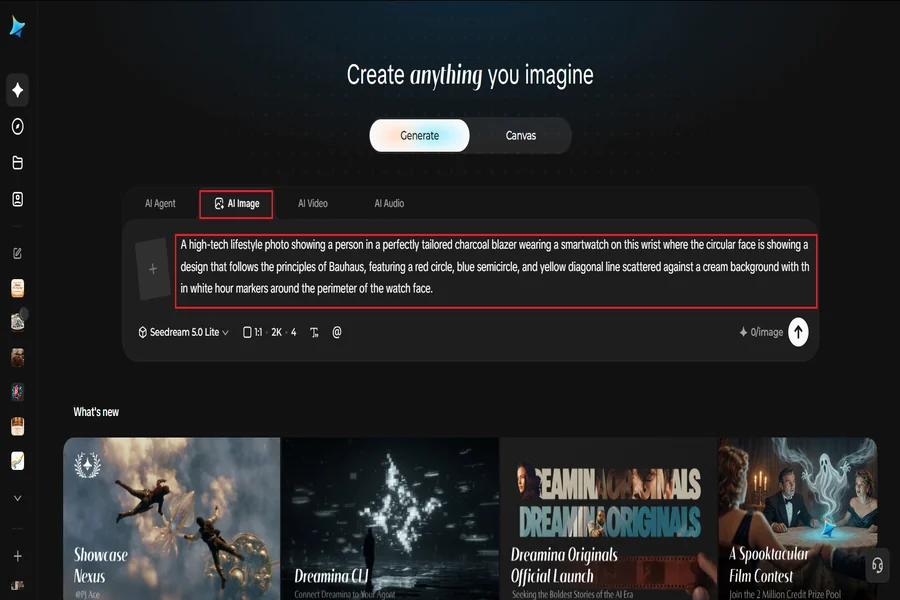
Step 1: Provide a text prompt or upload an image
Go to Dreamina and compose a detailed text prompt that illustrates the person wearing the smartwatch along with the dials on the watch itself. You may also upload an image, such as a painting you adore or a sketch of your layout, to enhance the quality of your text prompt.
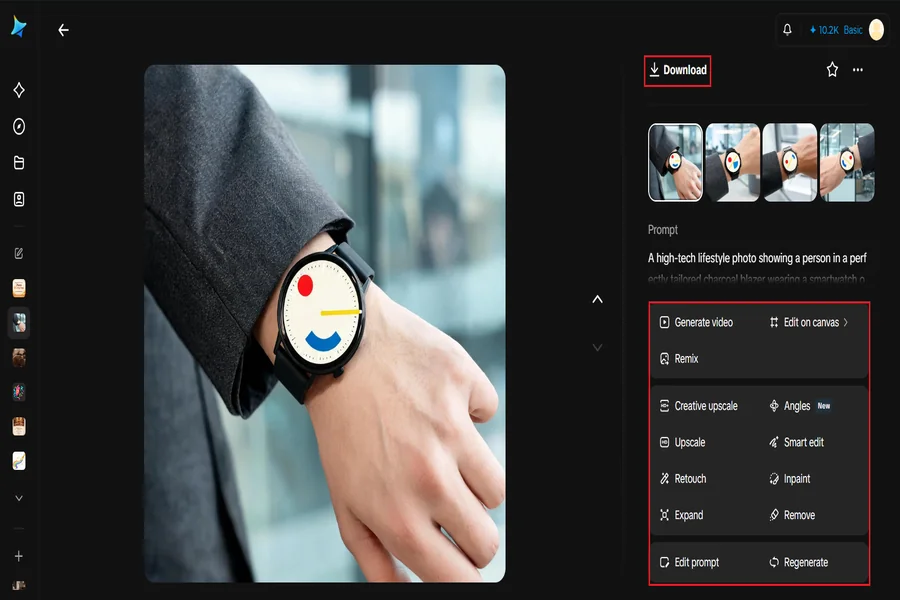
Here is an example of a prompt that can be used: A high-tech lifestyle photo showing a person in a perfectly tailored charcoal blazer wearing a smartwatch on this wrist where the circular face is showing a design that follows the principles of Bauhaus, featuring a red circle, blue semicircle, and yellow diagonal line scattered against a cream background with thin white hour markers around the perimeter of the watch face.
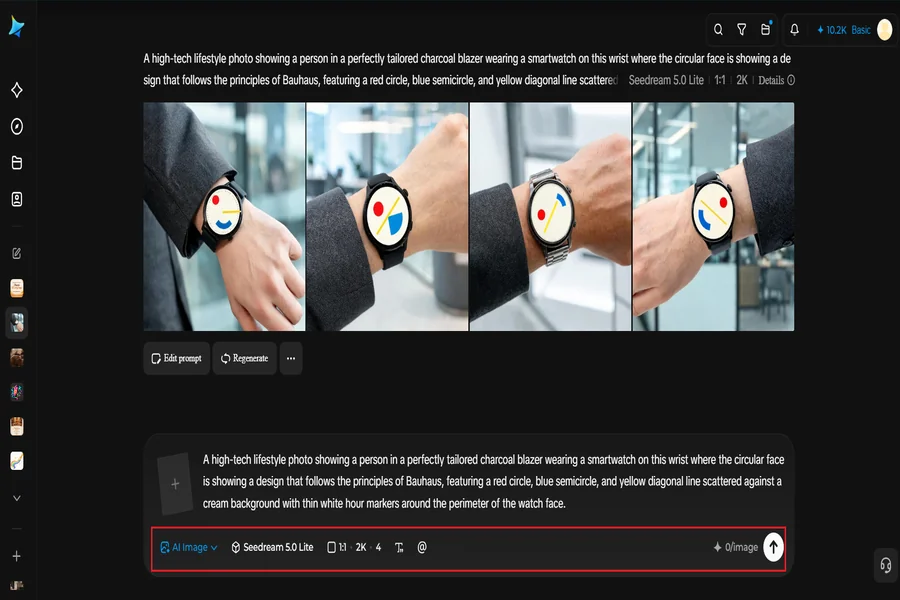
Step 2: Modify values and make your generation
Pick your model like Image 5.0 Pro by Seedream 5.0 Pro, then adjust the aspect ratio, size, and resolution. When all sets, hit Dreamina’s icon to create your watch face design.
Step 3: Personalize and save
Take advantage of Dreamina’s AI features like inpainting, expanding, removing, or retouching in order to improve your artwork even more. For example, you may want to inpaint a cleaner centre, remove unnecessary marks, or retouch colors. The last step is to click “Download.”
Prompt formulas that work for dials
Prompts for watch faces benefit from structure. Try combining these building blocks:
-
Subject: “circular watch face design” or “smartwatch dial”
-
Color direction: “burnt orange, teal, and ivory palette”
-
Layout cues: “minimal hour markers, empty center, balanced composition”
-
Quality tags: “sharp vector-like edges, studio lighting, high detail”
If you want a flat design for a watch app, ask for a “flat top-down dial design on a plain background” instead of a lifestyle shot, and crop it into a circle afterward.
Turning generated art into a usable dial
Once you download your artwork, you can place it as a custom background in most smartwatch face editors, or send it to a manufacturer as a concept reference. Keep a few practical tips in mind: export at the highest resolution available, check that the design still reads clearly at small sizes, and test the face in both bright and dim lighting. Many designers generate several versions, from busy to minimal, and pick the one that stays legible on the wrist.
Ideas for themed watch collections
Instead of making one face, build a series. Collections look more professional and give fans something to follow:
-
A Primary Colors set inspired by Bauhaus and De Stijl.
-
A Museum After Dark set with deep navy, gold, and charcoal.
-
A Summer Pop set with halftone sunsets and neon accents.
-
A Quiet Gradients set inspired by Color Field painters.
Common mistakes to avoid
Few things hurt a watch face more than clutter. Avoid overly detailed centers that fight with the hands, low-contrast colors that vanish in sunlight, and random text that the AI may render incorrectly. If a result includes unwanted lettering, use the remove tool to clean it up.
Final thoughts
A watch face is art you carry everywhere. With Dreamina, you can explore modern art movements, compare leading image models, and refine your concept until it feels truly yours. Start with a movement you love, write a detailed prompt, and let the AI turn your wrist into a gallery.

David Corner is a names expert with 4 years of experience in researching name meanings, origins, and cultural significance. He is currently working with Nameshives.com, where he contributes to creating insightful and meaningful name content for a global audience.
